

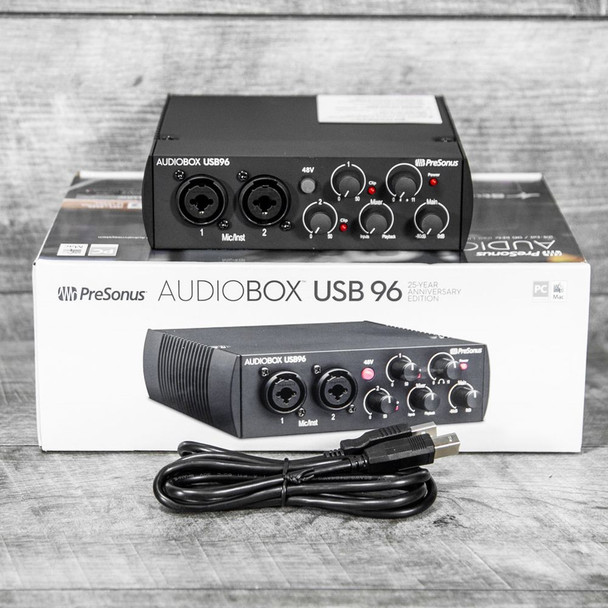
A cheap recording kit can be a smart buy, or it can become another box in the closet by next month. That is why the AudioBox USB 96 deal matters for U.S. singers, podcasters, guitar players, and bedroom producers who want to start recording without guessing which pieces fit together. The appeal is not only the lower bundle price. It is the relief of getting an interface, mic path, monitoring, and software direction in one cart, then moving on with the work. Sites tracking music gear deal coverage tend to catch these moments because entry-level studio gear moves fast when students, creators, and home musicians spot a real floor. A USB audio interface can look plain from the outside, yet that plainness is part of the draw here. You are not buying a status object. You are buying a door into cleaner vocals, direct guitar takes, voiceover tracks, demo songs, and practice-room ideas that no phone mic can handle with the same control.
Why AudioBox USB 96 Makes Sense for First Home Studios
The strongest case for this deal starts with a simple truth: most first recording spaces are not studios. They are spare bedrooms, dorm desks, garage corners, or kitchen tables after dinner. A low-cost box has to survive that mess. It needs to be easy enough for a tired beginner, stable enough for repeat takes, and cheap enough that the purchase does not drain the money needed for a stand, pop filter, cables, or acoustic help.
A USB audio interface that gets the boring parts right
The official PreSonus spec page lists a 2×2 design, 24-bit/96 kHz recording, two combo mic/instrument inputs, line outputs, a headphone output, and +48V phantom power. That is not glamorous copy. It is the checklist that decides whether a first session works or stalls before the song begins. A singer with a condenser mic needs phantom power. A guitarist needs an instrument input. A small desk with speakers needs balanced line outs.
The non-obvious win is that limits can help new users. Two inputs force choices. Record the vocal and guitar. Track two podcast speakers. Capture a keyboard in mono and a vocal on the other channel. A bigger interface can tempt a beginner into solving problems they do not have yet, then the session becomes menu work instead of recording work. Think about the first hour after delivery. The buyer plugs in the box, opens the software, turns one gain knob, and hears a voice in headphones. That first sound matters. It tells the brain, “This works.” The faster that moment arrives, the more likely the gear becomes part of a routine instead of a weekend experiment.
Picture a college student in Ohio cutting acoustic demos after class. One input takes the vocal mic. The other takes a guitar cable. Headphones keep the click from bleeding into the mic. That small chain teaches gain, distance, timing, and editing faster than a larger setup with unused knobs.
Why two inputs matter more than flashy extras
Two-input recording sits in a sweet spot for home use. One input feels tight the first time you invite another person over. Four or eight inputs sound tempting until you notice the extra cost, desk space, and setup steps. For most new creators, two channels cover the first year better than they expect.
This matters for podcasts as well. A solo show may begin with one mic, but a guest episode changes the whole workflow. Two mic inputs allow a local conversation without passing one microphone back and forth. That small detail can make the difference between a stiff recording and a natural talk.
There is also a teaching benefit. Two channels make cause and effect easy to hear. Turn the guitar down and the vocal sits higher. Move the mic away and the room grows. Pan two sources and the mix opens. These lessons sound basic, but they form the ear skills people need before they argue over preamp tone. The counterintuitive part is that a beginner recording setup should not chase every future use case. It should get the next ten sessions finished. Finished work builds judgment. After that, you will know whether you need more inputs, loopback tools, higher sample rates, or a different headphone system.
What the Bundle Actually Solves for New Creators
A bundle is only a deal if it removes friction. Many kits look affordable because the price tag hides missing pieces. Then the buyer discovers they still need headphones, speakers, a mic cable, software access, or a way to hear the take while recording. The better question is not “How much did I save?” It is “Can I record tonight?”
The home recording bundle saves money only when every piece gets used
PreSonus lists its complete package with the interface, recording software access, Eris 3.5 studio monitors, HD7 headphones, and an M7 MKII cardioid condenser microphone. That mix changes the value math because monitors and headphones are not bonus toys. They shape how a beginner hears mistakes, room noise, plosives, and uneven volume before those flaws harden into habits.
A home recording bundle also keeps the first purchase from turning into a scavenger hunt. New buyers often underestimate the mental cost of piecing together gear. They read ten tabs about microphones, five about headphones, and three about cables. By the time the cart is ready, the creative spark has cooled.
The less obvious benefit is shared compatibility. A kit from one brand is less likely to send a beginner into adapter trouble on day one. That does not mean every piece is perfect. It means the buyer starts with a system that has a clear intended path, which is often worth more than a tiny saving from mixing random sale items. Here is the catch: bundled gear is useful only when it matches the room. Small monitors can help with editing, but they will not fix bare walls, a humming air conditioner, or a desk jammed against a window. The smartest buyer treats the bundle as a starting kit, then spends time learning mic placement and volume control.
A beginner recording setup should remove doubt, not add menus
The first enemy of home recording is not bad gear. It is doubt. You wonder if the mic is working, if the input is too loud, if the headphones are plugged into the right jack, or if the software heard the correct channel. A good starter path reduces those decisions.
That is why software access has real value. A Studio One recording setup gives new users a common path from input to track to export. You still need patience, but you are not stitching together random downloads before the first take. When a kit points the whole chain in one direction, beginners spend less energy translating gear language.
This helps parents buying for a teenager, too. A gift that arrives with no clear next step can create pressure instead of joy. A kit with a mic, headphones, monitors, and recording software gives the young creator a first path: plug in, choose an input, record, listen back, adjust, repeat. That loop is where skill begins. The practical example is a school vocalist preparing a scholarship audition clip. She does not need a rack of gear. She needs a clear vocal take, a way to monitor, and enough confidence to record several passes. The right kit does not make her better by magic. It gives her fewer excuses to stop.
Where This Interface Still Fits in a Crowded Market
Budget recording gear has grown up. Buyers now compare tiny interfaces with newer ports, stronger headphone amps, loopback options, cleaner meters, and slick control apps. That pressure is good. It makes older entry-level gear earn its place. A lower bundle price only matters if the core fit remains sound.
Against newer rivals, age can be a hidden advantage
Many current guides praise newer budget choices for sound, control software, and low latency. MusicRadar’s 2026 budget interface guide, for example, places models such as the Audient iD4 MkII, Behringer U-Phoria UMC22, Universal Audio Volt 1, PreSonus Studio 24c, Focusrite Scarlett Solo, Arturia Minifuse 1, and M-Audio Producer Pack in the wider low-cost race. That tells you the field is crowded, not that one box wins every room.
The older design still has a plain strength. People know how to use it. Setup videos, forum answers, and beginner lessons are easier to find for long-running gear. That support trail has value when you hit a driver setting at 11 p.m. and need a fix before the apartment gets quiet again. There is a market reason this matters. Entry-level buyers often need confidence more than novelty. A fresh release may have better numbers on paper, but fewer real users have posted fixes, walkthroughs, and plain-language answers. For someone making a first EP or launching a local business podcast, that public knowledge can save a full evening.
Newer does not always mean easier. A compact interface with extra software layers can suit streamers, but a guitar player recording demos may prefer fewer choices. The right USB audio interface is the one that disappears after you set the gain and press record.
When singers, podcasters, and guitar players should still choose it
Singers get the clearest fit when they need a basic XLR path and headphone monitoring. A condenser mic can capture detail that laptop microphones flatten, but it also exposes room sound. That means the buyer should pair the gear with simple behavior: record away from hard walls, turn off noisy appliances, and use a pop filter.
Guitar players gain a different benefit. Direct input recording lets them write at low volume, use amp software, and avoid angry neighbors. In a Dallas apartment, that can matter more than a boutique preamp. The quiet workflow keeps practice and production alive during hours when a real amp would end the session.
Podcasters should think harder. For two local speakers, the two inputs make sense. For remote interviews, live streaming, or soundboard-heavy shows, a newer unit with loopback may suit the workflow. The deal is strongest when the buyer has a clear use, not a vague dream of becoming a studio owner. One overlooked group is teachers. A private vocal coach, guitar tutor, or online lesson creator may need a simple rig for lesson clips, homework examples, and student feedback. In that case, the Studio One recording setup is less about making a polished album and more about clear communication.
How to Buy the Deal Without Buying the Wrong Kit
The phrase “lowest bundle price” can push people into speed mode. That is where mistakes happen. A cart looks cheap, the product photo looks familiar, and the buyer assumes every seller includes the same extras. Bundles change. Retailers swap headphones, remove monitors, change software terms, or sell older packages under similar names.
Check the software, mic, cable, and headphone details before paying
Start with the exact contents. Look for the microphone model, headphone model, monitor pair, software term, and any missing stand or cable. A low price means less if the kit leaves out the part you need this week. It may still be a fair buy, but it is no longer the same buy.
Read the return policy as carefully as the discount. Audio gear can expose computer issues, USB noise, room hum, and beginner setup errors. A U.S. buyer ordering from a large retailer should know whether open-box returns carry restocking fees, whether software registration changes eligibility, and whether the seller handles warranty claims or points you back to the brand.
Watch the wording around “bundle,” “studio,” “complete,” and “package.” Retailers sometimes use similar phrases for different kits. One may include monitors. Another may include only headphones and a mic. Another may add store-brand accessories. A ten-second contents check can protect the whole purchase. This is where an internal planning step helps. Before buying, scan a starter home studio checklist and a beginner podcast gear guide. A short list prevents the classic mistake: saving on the interface, then overspending on rushed accessories because the first recording session exposed a missing stand.
The right deal depends on your room, not the sale badge
A bedroom with carpet, curtains, and a packed bookshelf can make a modest microphone sound better than an expensive mic in a bare square room. That surprises new buyers. They assume the interface decides the quality. In practice, the room, the source, and the mic distance often carry more weight than the box on the desk.
For a rapper in Atlanta recording vocals at night, the better purchase may be the bundle plus a heavy blanket behind the mic and a pop filter. For a podcaster in Phoenix with tile floors, headphones matter because speakers in a reflective room can mislead editing choices. For a guitarist in Portland, direct recording may solve noise limits better than any mic.
The sale can still be the right move. A lower entry price leaves room for the boring items that improve results: a stable stand, a pop filter, a longer cable, a rug, or a backup drive. Those items do not look exciting in a cart, but they protect the session from noise, bumps, and lost files. One more buyer test: ask how you will record in the next seven days. If the answer is “I want to try someday,” wait. If the answer is “I need a vocal demo this weekend,” the lower price has a purpose. Gear should answer a near-term plan, not a fantasy version of your studio. That mindset keeps the discount in its proper place. Do not let the sale badge choose for you. Decide what the next project needs. If the answer is two clean inputs, basic monitoring, software direction, and a fair starter mic path, the home recording bundle makes sense. If the answer is live streaming with routing tricks, four guests, or drum recording, wait and buy a unit built for that job.
Conclusion
The best starter gear is rarely the loudest product on the page. It is the one that lowers the distance between wanting to record and hearing a usable take. This PreSonus deal works because it speaks to that gap. It gives beginners a practical path into vocals, guitar, podcasts, lessons, demos, and rough mixes without turning the first purchase into a research project. For the buyer who wants a clean start, AudioBox USB 96 is not attractive because it feels new; it is attractive because the job is clear. Still, the lowest bundle price should not make you careless. Check the exact contents, software terms, seller policy, and room needs before paying. A good kit does not promise a career. It protects the fragile moment when you are willing to learn, make mistakes, and try another take. The right purchase is not the cheapest box. It is the one that gets used on Tuesday night, then again on Friday, until the habit becomes part of your life.
Frequently Asked Questions
How much should a first-time buyer spend on a recording interface bundle?
Most beginners should set a full budget, not an interface-only budget. Include the mic, headphones, stand, cable, pop filter, and any room fixes. A lower bundle price helps when it leaves enough money for the small accessories that make recordings usable.
Is a USB audio interface better than recording through a laptop mic?
Yes, for most music, podcast, and voiceover work. It gives you proper mic inputs, gain control, headphone monitoring, and cleaner signal handling. A laptop mic can capture ideas, but it offers limited control over tone, noise, and distance.
What makes a home recording bundle worth buying?
It earns its price when the included pieces work together and solve real gaps. The interface, microphone, headphones, monitors, and software should support the same goal. A bundle loses value when half the items stay unused or need instant replacement.
Can this type of interface record vocals and guitar at the same time?
Yes, a two-input design can handle a vocal mic and one guitar input at once. That works well for demos, lessons, songwriting sessions, and simple live takes. You will need more inputs for drums, full bands, or several local podcast guests.
Is a beginner recording setup good enough for podcasting?
It can be, especially for one or two speakers in the same room. The bigger concern is the room sound, mic technique, and editing process. Remote interviews or live shows may need extra routing features that some starter interfaces do not offer.
Do I need studio monitors right away?
Headphones can get you started, but small monitors help you hear balance, low-end issues, and editing choices in a different way. In apartments, use monitors at modest volume and check mixes on headphones, car speakers, and phone speakers.
What should I check before buying a discounted bundle?
Confirm the exact box contents, software access period, seller return policy, warranty path, and whether any used or open-box terms apply. Photos can lag behind listings, so trust the written contents more than the hero image.
Who should skip this deal and buy something else?
Skip it if you need four or more inputs, advanced streaming routing, drum recording, or a mobile rig with specific modern ports. A deal is only good when it fits the work you plan to do in the next few months.